How I made a Terminal Wave Animation in C++
A few days ago I was messing around with terminal graphics and thought - what if I could make something that looks cool with just ASCII characters? So I ended up creating this wave animation thing that runs in your console.
The Idea
The concept is simple: use sine waves to generate values, then map those values to ASCII characters. Darker characters for low values, brighter for high values. Update it in a loop and you get animation.
The Code
Here's what I came up with:
main.cpp-cpp#include <iostream>
#include <cmath>
#include <thread>
#include <chrono>

int main() {
    const int w = 80;
    const int h = 24;
    float t = 0.0f;

    std::cout << "\033[2J\033[?25l";

    while (true) {
        std::cout << "\033[H";

        for (int y = 0; y < h; y++) {
            for (int x = 0; x < w; x++) {
                float v =
                    std::sin(x * 0.15f + t) +
                    std::sin(y * 0.15f + t) +
                    std::sin((x + y) * 0.1f + t);

                int c = (int)((v + 3) * 4);
                const char chars[] = " .:-=+*#%@";
                std::cout << chars[c % 10];
            }
            std::cout << "\n";
        }

        t += 0.1f;
        std::this_thread::sleep_for(std::chrono::milliseconds(50));
    }
}
Breaking It Down
Setup
I defined the terminal size as 80x24 (standard console dimensions) and a time variable t that increments each frame for animation.
Terminal Escape Codes
cppstd::cout << "\033[2J\033[?25l";
This clears the screen (\033[2J) and hides the cursor (\033[?25l). The \033[H inside the loop moves the cursor back to the top-left corner each frame instead of clearing, which prevents flickering.
The Wave Function
The magic happens here:
We can see three sine waves:
- First one moves horizontally
- Second one moves vertically
- Third one moves diagonally
The 0.15 and 0.1 are frequency multipliers - smaller values = wider waves. Adding t to each makes them animate over time.
Since ranges from -1 to 1, adding three of them gives us a range of about -3 to 3.
Mapping to Characters
cppint c = (int)((v + 3) * 4);
const char chars[] = " .:-=+*#%@";
std::cout << chars[c % 10];
I shift v by 3 (making it 0 to 6), multiply by 4, and use modulo 10 to keep it in bounds. This maps the wave value to an index in my character array.
The characters go from dim to bright: space is darkest, @ is brightest. Simple
Result
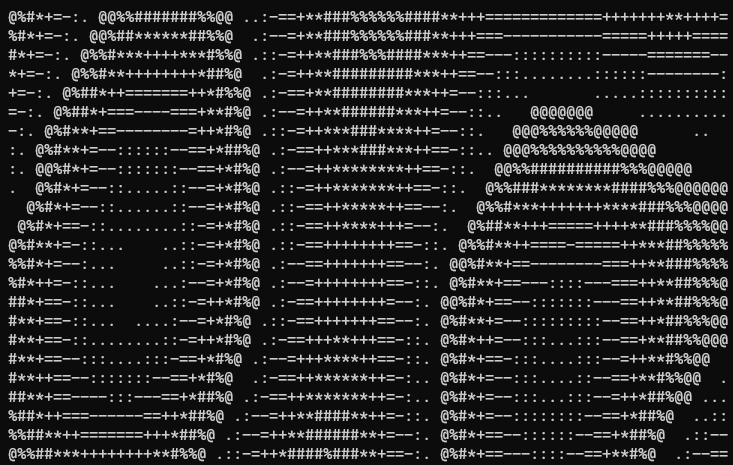
The interference patterns from the three waves create this cool ripple effect that moves across the screen. It's not much code but looks pretty decent.
Additional Notes
If you want to experiment, try changing the frequency values (0.15, 0.1) or add more sine waves. You can also mess with the character set or frame delay.
That's it. Not really complicated but fun to play with :D