How I made a cheat for R.E.P.O in an afternoon
So I was playing REPO with my friend today, idk why would I even do that after more than half a year of not touching it, but anyway. When she stopped playing and went to bed or whatever, I started working on a cheat for REPO that I wanted to do for a long time.
It wasn't really hard. Why? Because people in Unity are not really smart let's say, and decided to use .NET, which straight up gives you the full source code even after build. Like bro, just use IL2CPP...
What even is REPO
For those uneducated people, it's a co-op horror game where you collect valuables and bring them to extraction without dying. Pretty fun with friends. I have 130 hours on it which is not healthy but whatever.
Tools
- dnSpyEx - to read the game's C# code (use the Ex fork, original is dead)
- SharpMonoInjector - to inject the compiled DLL into the running game
- Visual Studio - to write and build the cheat (how unexpected)
If you don't know the difference between Mono and IL2CPP Unity builds, go read my game hacking guide first, or some Unity docs.
Reading the game code
Open Assembly-CSharp.dll from REPO_Data/Managed/ in dnSpyEx. The entire game is just... there. Readable C#. Classes, methods, field names, everything.
I looked around PlayerController, PlayerHealth, PlayerAvatar and StatsManager for maybe 20 minutes and found everything I needed. The funniest thing I found was this:
textPlayerController.DebugNoTumble - public bool
PlayerController.DebugEnergy   - public bool
The devs left debug flags in the shipping build. DebugNoTumble blocks the ragdoll system. DebugEnergy disables stamina drain. They literally did the work for me, I just had to find it and set it to true. Goofy ahh devs.
Finding fields and methods in dnSpyEx
This is the part nobody explains well. When you find a field you want to use from your cheat, you need two things: the field name and whether it's public or private.
Click any field or method in dnSpyEx and the status bar at the bottom shows you the token (like 0x04002377). You don't actually use the token in code, it's just a unique ID. What matters is the access modifier in the decompiled code.
If it's public, access it directly:
csharppc.DebugNoTumble = true; // public, no reflection needed
If it's private or internal, you need reflection:
csharp// get the FieldInfo once at class level and cache it
private static readonly FieldInfo _healthField = typeof(PlayerHealth)
    .GetField("health", BindingFlags.Instance | BindingFlags.NonPublic | BindingFlags.Public);

// then use it wherever
_healthField?.SetValue(ph, 100);
BindingFlags.NonPublic | BindingFlags.Public covers both cases so you don't have to guess. The ?. null check is there because if you typo the field name, GetField returns null instead of crashing immediately (easier to debug)
For methods it's the same idea but with GetMethod and Invoke. Didn't need that here since almost everything I used was public.
Project setup
Create a Class Library project in Visual Studio, target .NET 4.8, and reference these from REPO_Data/Managed/:
Assembly-CSharp.dllUnityEngine.dll+ modules you need (CoreModule, IMGUIModule, InputLegacyModule, etc.)
Now you can use Unity and game types directly in your code like you're writing a mod for BepInEx.
Entry point
Unity Mono cheats work by injecting a DLL that adds a MonoBehaviour to a persistent GameObject. SharpMonoInjector calls Loader.Load() on injection:
csharppublic class Loader
{
    private static GameObject _cheatObject;

    public static void Load()
    {
        _cheatObject = new GameObject("REPOCheat");
        _cheatObject.AddComponent<CheatBehaviour>();
        UnityEngine.Object.DontDestroyOnLoad(_cheatObject);
    }

    public static void Unload()
    {
        UnityEngine.Object.Destroy(_cheatObject);
    }
}
DontDestroyOnLoad is important, without it your cheat dies on scene transitions.
From here CheatBehaviour is just a normal MonoBehaviour. Update() runs every frame, OnGUI() handles the menu. Unity already has a built-in UI system (legacy IMGUI) so you don't even need ImGui. It looks like ass but it works.
God mode, no ragdoll, infinite stamina
These are the ones I'm most happy with. Simple, clean, work perfectly.
God mode runs every frame. InvincibleSet takes a duration in seconds so calling it with 9999 every frame keeps it permanent. health is a private field so I need reflection to set it:
csharpprivate static readonly FieldInfo _healthField = typeof(PlayerHealth)
    .GetField("health", BindingFlags.Instance | BindingFlags.NonPublic | BindingFlags.Public);

// runs in Update()
ph.InvincibleSet(9999f);
_healthField?.SetValue(ph, 100);
I cache the FieldInfo once at class level instead of calling GetField every frame, that would be wasteful.
No ragdoll and infinite stamina are literally one line each because the devs left those debug flags in:
csharppc.DebugNoTumble = _noRagdoll;     // blocks ragdoll on damage/enemy hits
pc.DebugEnergy = _infiniteStamina; // skips sprint drain timer
if (_infiniteStamina)
    pc.EnergyCurrent = pc.EnergyStart;
Side note: DebugNoTumble only blocks involuntary ragdoll. If you press the tumble key yourself it still works because voluntary tumble passes a different internal flag. Nice side effect.
Speed hack
The game has a built-in OverrideSpeed on PlayerController. You pass a multiplier and a duration, call it every frame to keep it active:
csharpif (_speedHack)
    pc.OverrideSpeed(_speedMultiplier, 0.5f);
else
    pc.OverrideSpeed(1f, 0.1f);
Multiplier goes 1x to 5x. Above 5x it gets stupid fast. The menu has a slider.
Upgrades
REPO's upgrade system is stored as dictionaries in StatsManager keyed by Steam ID. There's already a method to update them directly, so:
csharpprivate void SetUpgrade(string dictName)
{
    string steamID = _steamIDField?.GetValue(PlayerAvatar.instance) as string;
    if (string.IsNullOrEmpty(steamID)) return;

    // DictionaryUpdateValue updates the in-memory dict
    StatsManager.instance.DictionaryUpdateValue(dictName, steamID, _upgradeValue);
}
One thing that got me: speed and stamina upgrades only apply at level load in LateStart(), so changing them mid-run does nothing for that run. That's why the speed multiplier is a separate feature that works immediately.
Troll menu
REPO's chat parses TMP rich text tags, and ChatManager has a ForceSendMessage method. So you can send some funny shit:
csharpprivate void SendChat(string message)
{
    if (ChatManager.instance == null) return;
    ChatManager.instance.ForceSendMessage(message);
}

// flashbang - size=-111111 causes a screen flash
SendChat("<size=-111111>hi");

// massive text on everyone's screen
SendChat("<size=999>HELLO");

// invisible message
SendChat("<alpha=#00>ghost message");
Multiplayer only though. ChatManager.Update() returns early in singleplayer so none of this works solo.
ESP (the one I gave up on)
This is the embarrassing part. The ESP draws player names, HP and distance through walls. Except it draws wrong. The further away a player is, the more the label drifts left of where they actually are.
I tried multiple world-to-screen approaches, different cameras, everything:
csharpprivate Camera GetGameCamera()
{
    var pc = PlayerController.instance;
    if (pc != null && pc.cameraGameObjectLocal != null)
    {
        var cam = pc.cameraGameObjectLocal.GetComponentInChildren<Camera>();
        if (cam != null) return cam;
        cam = pc.cameraGameObject.GetComponentInChildren<Camera>();
        if (cam != null) return cam;
    }
    // last resort
    foreach (var cam in Camera.allCameras)
    {
        if (cam.enabled && !cam.orthographic && cam.gameObject.activeInHierarchy)
            return cam;
    }
    return Camera.main;
}

private bool WorldToScreen(Camera cam, Vector3 worldPos, out Vector2 screenPos)
{
    screenPos = Vector2.zero;
    Vector3 vp = cam.WorldToViewportPoint(worldPos);
    if (vp.z < 0) return false;
    screenPos = new Vector2(vp.x * Screen.width, (1f - vp.y) * Screen.height);
    return true;
}
Nothing worked. Still drifts left at distance. I even left a debug label in showing which camera is being used to rule out wrong camera issues. The math looks correct but the output isn't, and I have no idea why.
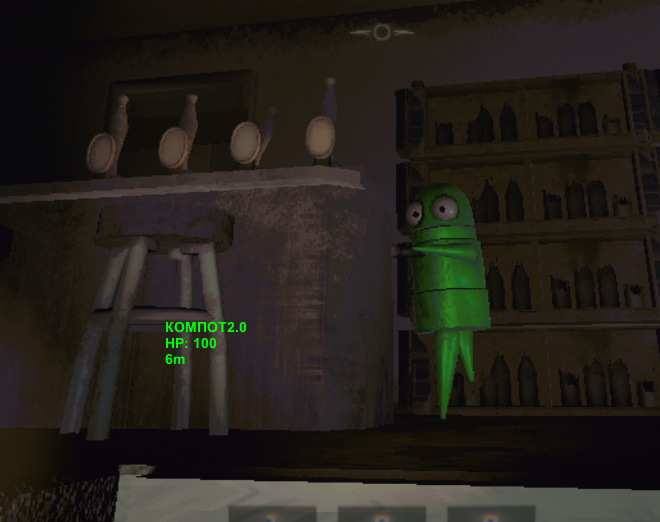
Gave up on it. ESP in a friend lobby cheat is kinda useless anyway.
If you know what's wrong, let me know on discord, or just create a PR/issue on github.
Building and injecting
- Build as Release, .NET 4.8, Class Library
- References point to
REPO_Data/Managed/ - Launch game, load into a level (not main menu, player instances won't exist yet)
- Inject:
textsmi.exe inject -p REPO -a "path\to\cheat.dll" -n cheat -c Loader -m Load
- Press Insert in-game
Why this is easier than C++ cheats
No offsets. No pattern scanning. No ReadProcessMemory. You just use the game's own classes because the entire codebase is sitting in a DLL waiting for you to read it.
The tradeoff is it's more detectable and only works on Mono builds, but for messing around in a friend lobby that doesn't matter.
Source code
This is what the source code looked like while I was writing this blog. It will probably be updated on github soon, so don't take this as the final version:
cpp373 linesusing System; using System.Reflection; using UnityEngine; // this file looks like absolute mess // i will update this later367 more lines
Updated source is on GitHub. Don't resell it, it's free.