Unreal Engine Features You're Probably Not Using
So I've been balls deep in Unreal Engine 5.6.1 lately, both for school projects and my own stuff, and I keep finding features that should be obvious but... nobody fucking uses them. Like, people in my class are out here manually typing console commands every time they launch the editor, or copy-pasting the same blueprint code across 50 actors because they don't know about Blueprint Function Libraries.
This isn't some "10 Advanced UE5 Tricks" clickbait. These are legitimately useful features that'll save you hours of headaches if you actually use them.
Blueprint Function Libraries
Let me start with this because it blew my mind when I found it. You know how you have that one blueprint function you keep copy-pasting everywhere? Health calculations, damage multipliers, vector math, whatever? Yeah, stop doing that.
Blueprint Function Libraries let you create static functions that work across your entire project. No inheritance, no casting, just pure utility functions you can call from anywhere.
Right-click in Content Browser → Blueprint Class → Blueprint Function Library. Name it something like BP_GameplayHelpers or whatever. Now any function you make in there is accessible from ANY blueprint in your project through the right-click menu.
I use this for:
- Damage calculation formulas
- String formatting for UI
- Math helpers (especially for movement systems)
- Debug draw functions
Game changer for keeping your code clean and not repeating yourself like an NPC.
Format Text (String Formatting Done Right)
If you're still doing "Append" nodes in a chain to build strings... there's a better way.
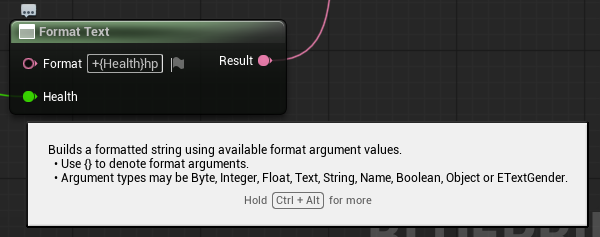
Format Text node lets you build formatted strings with variables inline. Instead of:
text"Health: " + Append + ToString(Health) + Append + "/" + Append + ToString(MaxHealth)
You just do:
Format Text: "Health: {Health}/{MaxHealth}"
Type your format string with {VariableName} placeholders, then the node auto-generates input pins for each variable. Way cleaner.
I use this constantly for:
- UI text (
"+{Amount}HP","Wave {Current}/{Total}") - Debug messages (
"Player at {X}, {Y}, {Z}") - Damage numbers (
"-{Damage}") - Literally any string with variables
Supports multiple types too - integers, floats, booleans, names, whatever. No more ToString spam everywhere.
Here is a simple example:
Execute Console Command
This one's simple but stupid useful. You can run ANY console command directly from blueprints during runtime.
Node is literally called "Execute Console Command" - type it in blueprint search. Feed it a string like exit, stat fps or r.SetRes 1920x1080 and boom, it runs.
Why is this useful?
- Quick debug toggles (visibility channels, collision visualization)
- Performance testing without stopping the game
- Custom dev cheats for testing
- Resolution/graphics changes without rebuilding UI
I have a dev menu in all my projects now that just fires different console commands. Way faster than making proper debug UI for everything.
BlendSpaces (for Animation)
If you're still using animation blueprints with a million branches and "play animation" nodes, stop. BlendSpaces exist for this exact reason.
BlendSpace lets you blend between multiple animations based on 1-2 input variables. Moving forward? Blend between idle, walk, run based on speed. Aiming? Blend between aim directions based on pitch/yaw.
Animation → BlendSpace → 1D or 2D (depending on your needs).
Most common use: locomotion. Horizontal axis = movement speed (0-600), plug in idle/walk/run animations. The engine smoothly blends between them automatically. No code, no bullshit transition graphs.
You can even preview it in the editor by dragging the inputs around.
Collision Presets & Custom Collision Channels
Default collision channels are ass for any real game. You got like 6 overlapping "Pawn" and "WorldDynamic" objects fighting over what blocks what.
Project Settings → Collision → New Object Channel. Make your own: PlayerProjectile, EnemyProjectile, Interactable, Loot, whatever.
Then make presets:
PlayerProjectileblocksEnemy, ignoresPlayerandPlayerProjectileEnemyProjectileblocksPlayer, ignoresEnemy
Now your player can't shoot themselves, enemies can't friendly fire, and you didn't write a single line of collision filtering code.
Set it once in project settings, apply presets to your actors. Done.
Data Tables & Struct Usage
People sleep on Data Tables hard. If you're storing game data (weapon stats, enemy health, item info) in individual blueprint variables scattered across 50 actors... bro, what are you doing?
Make a struct (Blueprint → Structure), define your data format:
textWeaponStats:
- Damage (float)
- FireRate (float)
- MagSize (int)
- ReloadTime (float)
Then make a Data Table (Miscellaneous → Data Table), pick your struct, fill in the rows. Now you got a spreadsheet-style database in UE5.
Access it from any blueprint with "Get Data Table Row". One source of truth for all your game data. Change weapon damage? Edit the data table, not 50 blueprints.
You can even edit these as CSV files externally. Way easier for balancing.
Timer Handles (Proper Way)
If you're using "Delay" nodes everywhere... it works, but it's messy as hell and you can't cancel them or check their status.
Use Timer Handles instead:
Set Timer by Event- more control than delaySet Timer by Function Name- call functions on a loop- Can pause, resume, clear timers
- Can check if timer is active
- Can get remaining time
Example: Instead of "Delay 3 seconds → Deal Damage", use a timer handle. Now you can cancel the damage if the player dies, check if DOT is already active, etc.
Especially useful for:
- Damage over time effects
- Cooldown systems
- Respawn timers
- Any delayed action that needs to be cancellable
Animation Montages vs Regular Animations
If you're playing attack animations directly in the animation blueprint... you're doing it wrong.
Animation Montages exist for one-shot animations you trigger from code: attacks, reloads, taking damage, dying, whatever.
Regular animation blueprint = looping stuff (idle, walk, run) Montages = triggered actions
Make a montage (right-click animation → Create → Animation Montage), then play it from blueprints with "Play Montage". You get:
- Blend in/out control
- Notify events (spawn VFX on frame 23, deal damage on frame 45)
- Can be interrupted/cancelled
- Slots for layering animations
Way more control than just playing animations raw.
Cool, here's the section:
Soft Object References (Stop Loading Everything at Once)
If you're using regular object references for everything, your game is probably loading way more shit into memory than it needs to.
Hard reference = loads the asset immediately when your blueprint loads Soft reference = loads only when you actually need it
Example: You got a weapon system with 50 different gun meshes/sounds. If you use hard references to all of them in your weapon manager, ALL 50 guns load into memory at game start. Even if the player only uses 3 of them.
Use Soft Object References instead.
In your blueprint variable, change type from Static Mesh to Soft Object Reference → Static Mesh. Now it doesn't auto-load.
When you actually need it:
- Use "Load Asset" or "Async Load Asset" nodes
- Wait for it to load
- Use it
Async Load is better - doesn't freeze the game while loading.
This is huge for:
- Large texture/mesh libraries
- Audio banks (music, sound effects)
- Level streaming assets
- Anything you don't need immediately at startup
Yeah, it's more nodes than just dragging a reference. But when your game starts in 2 seconds instead of 15, you'll get it.
Also use this for Data Tables if they're massive. Load them async when transitioning between menus/levels, not at startup.